


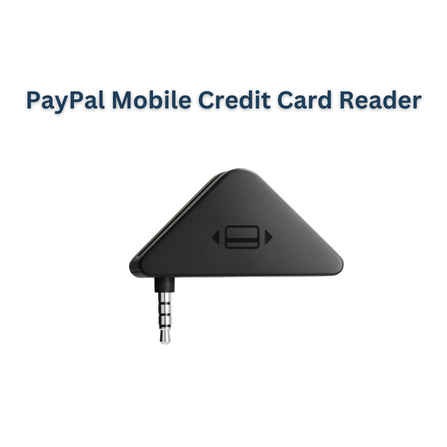
In today’s business world, being able to accept card payments anywhere has become essential. Whether you run a food truck, a small boutique, a service business that visits clients, or a pop-up stall at a market, you want a payment solution that is flexible, secure, and easy to use. That’s where the PayPal Card Reader comes in.
This article explores what the PayPal Card Reader is, why it matters (especially for mobile or small-business setups), its key features and benefits, how to set it up and use it, things to consider, and whether it’s right for your business.
What is the PayPal Card Reader?
The PayPal Card Reader is a compact payment device that allows you to accept credit and debit cards, as well as contactless payments, by pairing with your smartphone or tablet via Bluetooth or USB and using the PayPal Point of Sale (POS) or PayPal app. It supports modern payment methods including chip & PIN, contactless, and mobile wallets such as Apple Pay and Google Pay, and connects directly to your PayPal merchant or business account. This makes it possible to process payments on the go, in a fixed retail space, or at mobile events. According to PayPal, “The Card Reader 2 uses Bluetooth to pair to your smartphone or tablet and accepts the same payment methods as the Card Reader.” Merchant Maverick adds that it is a Bluetooth-enabled contactless, chip, and PIN card reader capable of accepting Apple Pay, Google Pay, and Samsung Pay. In short, it’s a modern, portable card-acceptance device from PayPal.
Why This Matters for Business
For businesses that are not fixed to one counter, such as delivery services, outdoor market stalls, pop-up shops, or mobile service providers, the PayPal Card Reader offers the flexibility to accept payments wherever you are. It removes the need for bulky POS hardware, requiring only your mobile device and the reader. Modern customers expect multiple payment methods, and the reader supports chip cards, contactless cards, and mobile wallets, which reduces the risk of losing sales due to unsupported payment types. Compared with full POS systems that involve wires, counters, printers, and cash drawers, the PayPal Card Reader is simple, affordable, and quick to deploy. For businesses that already use PayPal online, it unifies in-person and online payments while providing reporting, sales tracking, and easy fund transfers. Using a dedicated card reader also enhances professionalism, giving customers confidence in your ability to handle modern payments.
Key Features & Benefits
The PayPal Card Reader supports chip, swipe, and contactless payments, allowing nearly all types of card and wallet payments. By pairing with a smartphone or tablet, it leverages the device you already own, minimizing the need for extra hardware. Its compact and mobile-friendly design allows it to operate at events, markets, and mobile service locations, with battery life sufficient for multiple hours or up to 100 transactions. Many markets do not require a long-term contract, allowing small businesses to pay per transaction and avoid unnecessary commitments. Beyond payments, the POS system includes reporting, inventory tracking, and staff management tools, helping business owners make informed decisions. The device is built for security and PCI compliance, ensuring safe transactions and protection against fraud.
How to Set Up and Use the PayPal Card Reader
To start, purchase the PayPal Card Reader from a trusted vendor or reseller for your region, confirming compatibility with local currency, charging type, and payment networks. Next, download the PayPal Point of Sale app on your smartphone or tablet and create or upgrade to a PayPal Business account if necessary. Charge the reader using the included USB‑C cable or power adapter, and pair it with your mobile device through the app. Configure your business settings by entering your company profile, inventory or product details, pricing, categories, and the bank or PayPal account where funds will be transferred. If desired, set up additional hardware such as a receipt printer or cash drawer.
When a customer is ready to pay, ring up items in the app and allow them to tap, swipe, or insert their card, or use a mobile wallet. Once the payment is approved, you can send a receipt via email or print it if hardware allows. Use the PayPal dashboard or app to monitor sales, analyze payment types, identify top-selling items, and export data to accounting tools. Regularly charge the reader, update the app and firmware, and monitor the device for any issues.
Things to Consider / Limitations
While the PayPal Card Reader is versatile, it requires reliable network connectivity, as it pairs with a device and sends transactions through the app. Transaction fees apply for each payment, so it’s important to check local rates. Ensure the reader is compatible with your region in terms of plug type, supported cards, and local banking networks. If you need a full retail checkout setup with a receipt printer, cash drawer, or barcode scanner, additional hardware may be required. Depending on your region and banking setup, funds may not appear immediately in your account. Battery life and device maintenance are important, and staff will require training on operation, troubleshooting, and handling refunds or failed transactions.
Who Is This Reader Especially Good For?
The PayPal Card Reader is ideal for mobile businesses such as food trucks, market vendors, home service providers, and delivery services. It suits small businesses looking to accept modern payments with minimal hardware and upfront costs. Businesses already using PayPal online benefit from unified payment management. It’s also suitable for businesses that frequently change locations, such as pop-up events, and for those that need a flexible setup without investing in a large fixed-counter POS system.
Final Thoughts
In a business environment where customers expect multiple payment options and mobility is essential, having a reliable, smart payment reader is crucial. The PayPal Card Reader delivers modern payment acceptance, portability, integration with PayPal’s merchant tools, low upfront cost, and professional capability. It allows businesses to accept cards and mobile wallets on the go, improve customer experience, and manage transactions efficiently.
Before adopting it, consider transaction fees, hardware compatibility in your region (especially in India/Punjab), connectivity reliability, and whether additional hardware is needed for receipts or cash handling. The device provides a low-cost, mobile, and professional solution for small and flexible businesses.

 English
 Arabic
 French
 Spanish
 Portuguese
 Deutsch
 Turkish
 Dutch
Dutch
 Russian
 Romaian
 Portuguese (Brazil)
 Tiếng Việt